> ## Documentation Index
> Fetch the complete documentation index at: https://docs.ctrlarcz.xyz/llms.txt
> Use this file to discover all available pages before exploring further.
# Address poisoning
> Why a lookalike address drains real users, and why locking funds after the fact does not help.
Address poisoning is the attack Ctrl+ArcZ exists to stop. It does not break a
wallet or a contract. It breaks the human habit of copying an address from your
own transaction history.
## The attack
An attacker mints a **lookalike** of an address you actually pay: a different
address that shares the same first and last visible characters. Wallets abbreviate
addresses as `0x3A5f…9C2b`, so the middle is never shown, and a vanity grinder
produces a matching pair in seconds.
The attacker then plants that lookalike in your history so it sits next to the
real address:
* **Zero-value bait.** They send you a 0-value token transfer from the lookalike.
Sending someone 0 tokens has no legitimate purpose. It exists only to make the
address appear in your history as if you had interacted with it.
* **Dust.** A tiny non-zero transfer does the same, dressed up to look like a real
payment.
* **Spoofed token.** A fake token contract emits a transfer that names the
lookalike, so it shows up in your activity feed.
Later you go to pay the real counterparty, scroll your history, and copy the
address that "looks right." It is the lookalike. You send real funds to it.
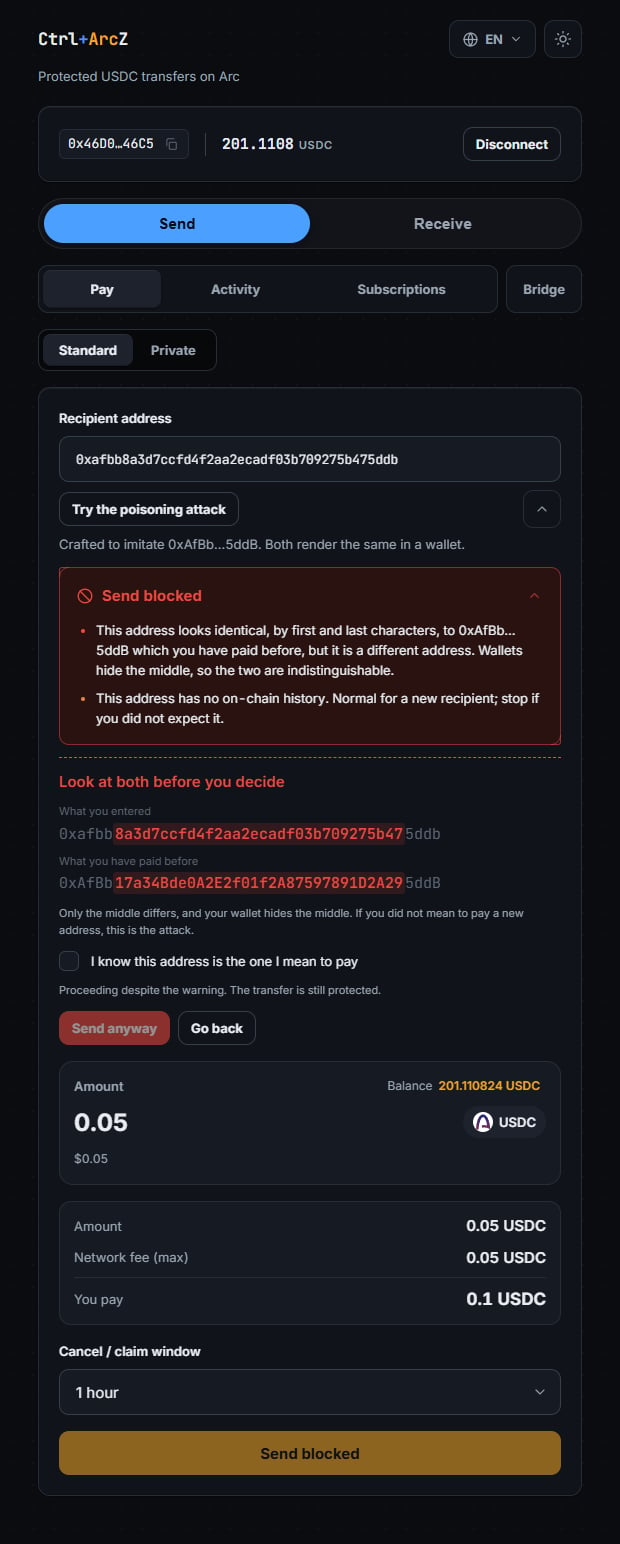
The demo stages exactly this: a crafted lookalike of an address you have paid,
planted in your own history, then caught on the way out.
 ## Why locking funds after the fact does not save you
This is the key insight, and it is baked into the firewall's own framing:
In a poisoning attack the victim sends to the wrong address **on purpose**. They
believe it is the right one. Escrow, clawback, or a code-gated claim protect you
from a recipient who should not receive the funds. Here you chose the recipient.
The only protection that works is refusing to send in the first place.
That is why the firewall (layer 1) is the actual defense against poisoning, and
the protected transfer (layer 2) is a separate safety net for a different failure
(a genuinely mistaken or unclaimed send, which stays recoverable). A code-gated
claim would not help against a lookalike, because the attacker who owns the
lookalike would simply not be given the code, and the funds would just sit until
you cancel. Poisoning is beaten by not sending.
## How the firewall detects it
The firewall assembles a report from on-chain data and runs a pure rule engine
over it. The rules, and the constants they use, live in the SDK:
`isLookalike` compares the target against every address you have paid before. A
match means the first `AFFIX_LENGTH` (4) hex characters and the last
`AFFIX_LENGTH` characters are identical, while the full address is not. That is
exactly the signature of a poisoning lookalike, and it is a hard block. Your
verified recipients feed this list too, so a lookalike of an address you reached
through a protected transfer is caught as well.
If the target has ever sent you a 0-value transfer, that is counted and blocked.
This is not a heuristic. A 0-value transfer has no honest use, so its presence is
treated as proof of a planting attempt, not a warning.
A poisoning address is minted for the attack, so it is almost always brand new. If
the target has no on-chain history at all, that is `NEW_ADDRESS`. If its first
activity is within `FRESH_ADDRESS_MAX_AGE_MS` (24 hours), that is `FRESH_ADDRESS`.
Both are warnings, not blocks: a brand-new recipient is also the most common
legitimate payment there is.
If a protected transfer to this exact address has settled before, that is
`VERIFIED_RECIPIENT`. If you have simply paid this exact address before, that is
`KNOWN_COUNTERPARTY`. These reassure, but they never override a block: an address
you paid last week does not make its lookalike safe.
The report also draws on your counterparties and the target's activity from
Blockscout (ArcScan): who you have paid, how old the target is, and how many
zero-value baits it sent you.
## The verdict, and fail-closed
The report carries a single `level`:
* **safe** proceeds.
* **warning** asks you to look again (the default policy lets it through; an
integrator config can escalate it to a block).
* **block** stops the send. A lookalike, a zero-value bait, or a scan that could
not rule a lookalike out all land here.
Crucially, the firewall is **fail-closed**. If a data source does not answer (your
send history, the target's activity, the zero-value scan, or your verified
recipients), the report is marked incomplete (`complete: false`) and it is never
reported as `safe`. When the missing source is your send history, the lookalike
rule could not run at all, so an unverified target is blocked outright rather than
merely warned: a firewall that waves traffic through when its data source is down
is worse than none.
A report is a snapshot taken at `checkedAt`. A bait transfer that lands after it
was taken would not appear in it, so `sendProtected` re-scans rather than trusting
a report older than a short freshness window.
## Next
* Wire it into your send path: [The firewall](/guides/firewall).
* The `check` function and `RiskReport` shape: [SDK reference](/reference/sdk-api).
* Where this layer fits with the others: [Overview](/concepts/overview).
This documentation is built and hosted on [Mintlify](https://mintlify.com), a developer documentation platform.
## Why locking funds after the fact does not save you
This is the key insight, and it is baked into the firewall's own framing:
In a poisoning attack the victim sends to the wrong address **on purpose**. They
believe it is the right one. Escrow, clawback, or a code-gated claim protect you
from a recipient who should not receive the funds. Here you chose the recipient.
The only protection that works is refusing to send in the first place.
That is why the firewall (layer 1) is the actual defense against poisoning, and
the protected transfer (layer 2) is a separate safety net for a different failure
(a genuinely mistaken or unclaimed send, which stays recoverable). A code-gated
claim would not help against a lookalike, because the attacker who owns the
lookalike would simply not be given the code, and the funds would just sit until
you cancel. Poisoning is beaten by not sending.
## How the firewall detects it
The firewall assembles a report from on-chain data and runs a pure rule engine
over it. The rules, and the constants they use, live in the SDK:
`isLookalike` compares the target against every address you have paid before. A
match means the first `AFFIX_LENGTH` (4) hex characters and the last
`AFFIX_LENGTH` characters are identical, while the full address is not. That is
exactly the signature of a poisoning lookalike, and it is a hard block. Your
verified recipients feed this list too, so a lookalike of an address you reached
through a protected transfer is caught as well.
If the target has ever sent you a 0-value transfer, that is counted and blocked.
This is not a heuristic. A 0-value transfer has no honest use, so its presence is
treated as proof of a planting attempt, not a warning.
A poisoning address is minted for the attack, so it is almost always brand new. If
the target has no on-chain history at all, that is `NEW_ADDRESS`. If its first
activity is within `FRESH_ADDRESS_MAX_AGE_MS` (24 hours), that is `FRESH_ADDRESS`.
Both are warnings, not blocks: a brand-new recipient is also the most common
legitimate payment there is.
If a protected transfer to this exact address has settled before, that is
`VERIFIED_RECIPIENT`. If you have simply paid this exact address before, that is
`KNOWN_COUNTERPARTY`. These reassure, but they never override a block: an address
you paid last week does not make its lookalike safe.
The report also draws on your counterparties and the target's activity from
Blockscout (ArcScan): who you have paid, how old the target is, and how many
zero-value baits it sent you.
## The verdict, and fail-closed
The report carries a single `level`:
* **safe** proceeds.
* **warning** asks you to look again (the default policy lets it through; an
integrator config can escalate it to a block).
* **block** stops the send. A lookalike, a zero-value bait, or a scan that could
not rule a lookalike out all land here.
Crucially, the firewall is **fail-closed**. If a data source does not answer (your
send history, the target's activity, the zero-value scan, or your verified
recipients), the report is marked incomplete (`complete: false`) and it is never
reported as `safe`. When the missing source is your send history, the lookalike
rule could not run at all, so an unverified target is blocked outright rather than
merely warned: a firewall that waves traffic through when its data source is down
is worse than none.
A report is a snapshot taken at `checkedAt`. A bait transfer that lands after it
was taken would not appear in it, so `sendProtected` re-scans rather than trusting
a report older than a short freshness window.
## Next
* Wire it into your send path: [The firewall](/guides/firewall).
* The `check` function and `RiskReport` shape: [SDK reference](/reference/sdk-api).
* Where this layer fits with the others: [Overview](/concepts/overview).
This documentation is built and hosted on [Mintlify](https://mintlify.com), a developer documentation platform.